
Lottie Accessibility Analyzer evaluates your animations against WCAG and ADA standards, identifying potential barriers and providing recommendations to make your content more inclusive.
What It Checks
The analyzer examines:
- Color contrast ratios and text legibility
- Visual elements that may affect users with visual impairments
- Motion and timing that could impact users with vestibular disorders
- Interactive elements and their accessibility for users with motor impairments
Supported Formats
The analyzer works with .lottie and .json animation files.
How to Use It
Option 1: Standalone Analyzer
- Visit the Lottie Accessibility Analyzer
- Upload your animation file
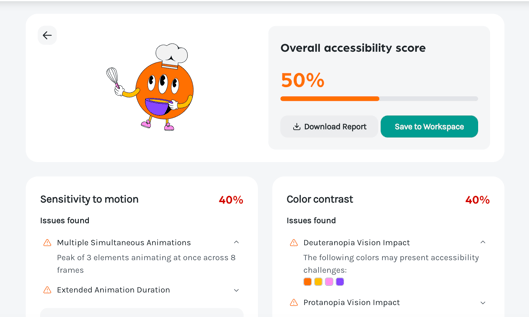
- Review the detailed accessibility report
Option 2: Within Your Workspace
- Upload and open your animation
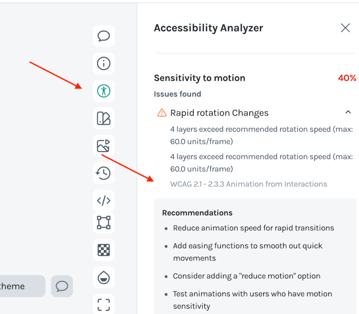
- Click the Accessibility panel in the right toolbar
- View your accessibility score and applied standards
For a comprehensive breakdown, download the full report from the analyzer tool.
Understanding the Results
The report highlights specific issues and provides actionable recommendations to improve accessibility, including:
- Which WCAG/ADA guidelines are not met
- Severity level of each issue
- Suggested fixes to address barriers
Why Accessibility Matters
Making animations accessible ensures your content reaches all users, improves overall user experience, and helps you meet legal compliance requirements.
Learn More
For detailed information about accessibility standards and best practices, visit the Lottie Accessibility Analyzer Documentation.