
Lottie animations may display differently across web, iOS, and Android due to varying platform support for certain animation features. The Feature Support Checker helps you identify compatibility issues before deployment.
What It Does
The Feature Support Checker analyzes your animation and shows which features are supported across different Lottie players and versions. This ensures your animation displays correctly on all target platforms.
How to Use It
- Open your Lottie animation in the workspace
- Click the Additional Information button (ⓘ) in the right panel
- Select Feature Support Checker from the dropdown
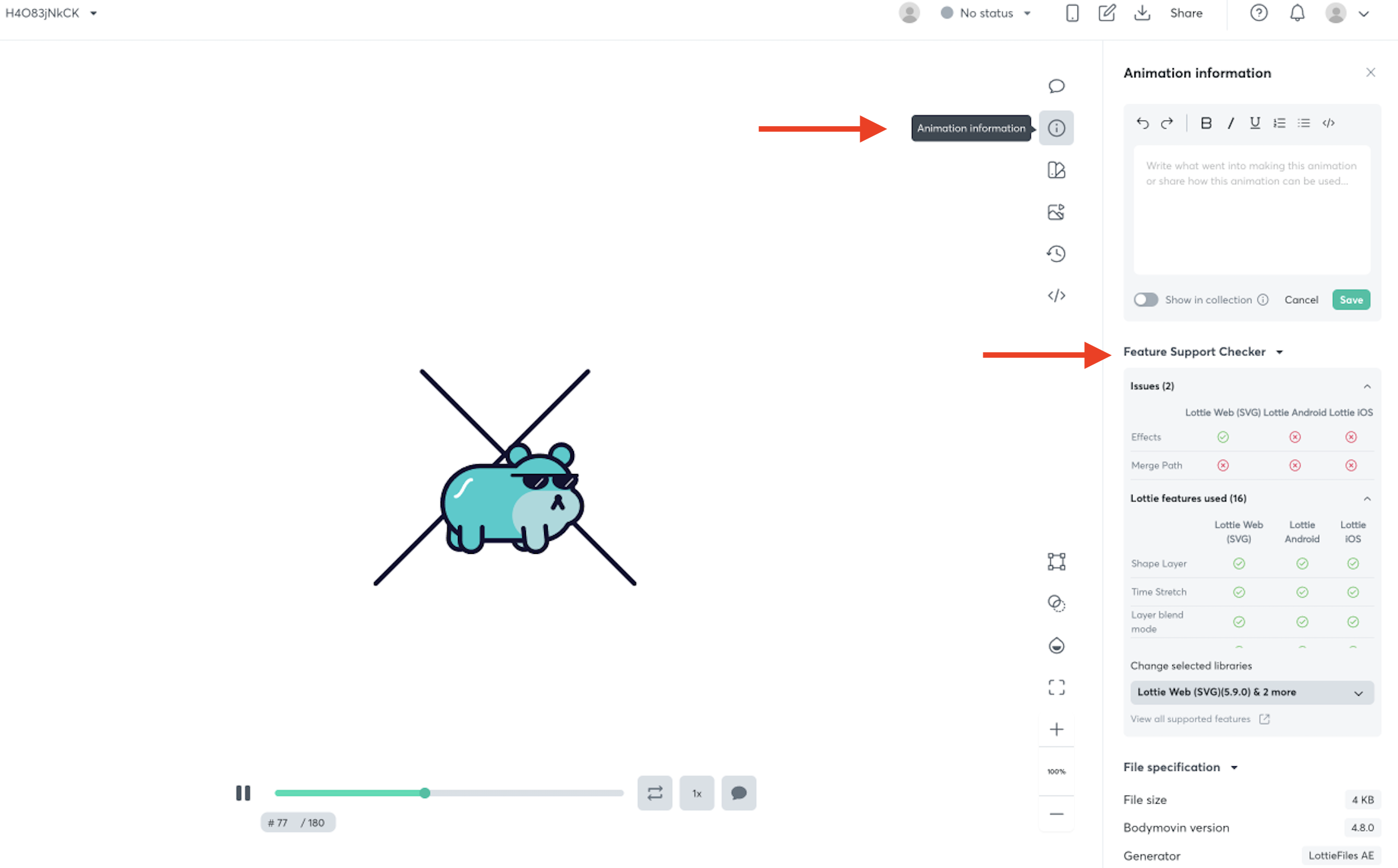
- Review the compatibility report showing which features are supported on each platform
Testing Other Libraries
To check compatibility with additional libraries:
- Click the Change selected libraries dropdown
- Select libraries such as Skottie or rlottie
- Choose different versions to test compatibility across multiple environments
Understanding the Results
The tool displays each feature used in your animation alongside its compatibility status for different Lottie player versions. Use this information to:
- Identify features that may cause rendering issues on specific platforms
- Decide whether to modify your animation or accept platform limitations
- Ensure consistent performance across all deployment targets
Tip: Run the Feature Support Checker before exporting your animation to catch compatibility issues early in your workflow.